Orders
Fixed quantities or open-ended lines on the job.
 Request demo

Material Tracking
Record material deliveries, supplier products, and water-meter readings. Review accepted quantities and import/export unit cost. Add Material Tracking to any plan using existing office and foreman seats.
What it does
The office creates the material order. Foremen log tickets against its lines as loads arrive.
Accepted tickets credit the order, keeping the recorded quantity and remaining need in view.
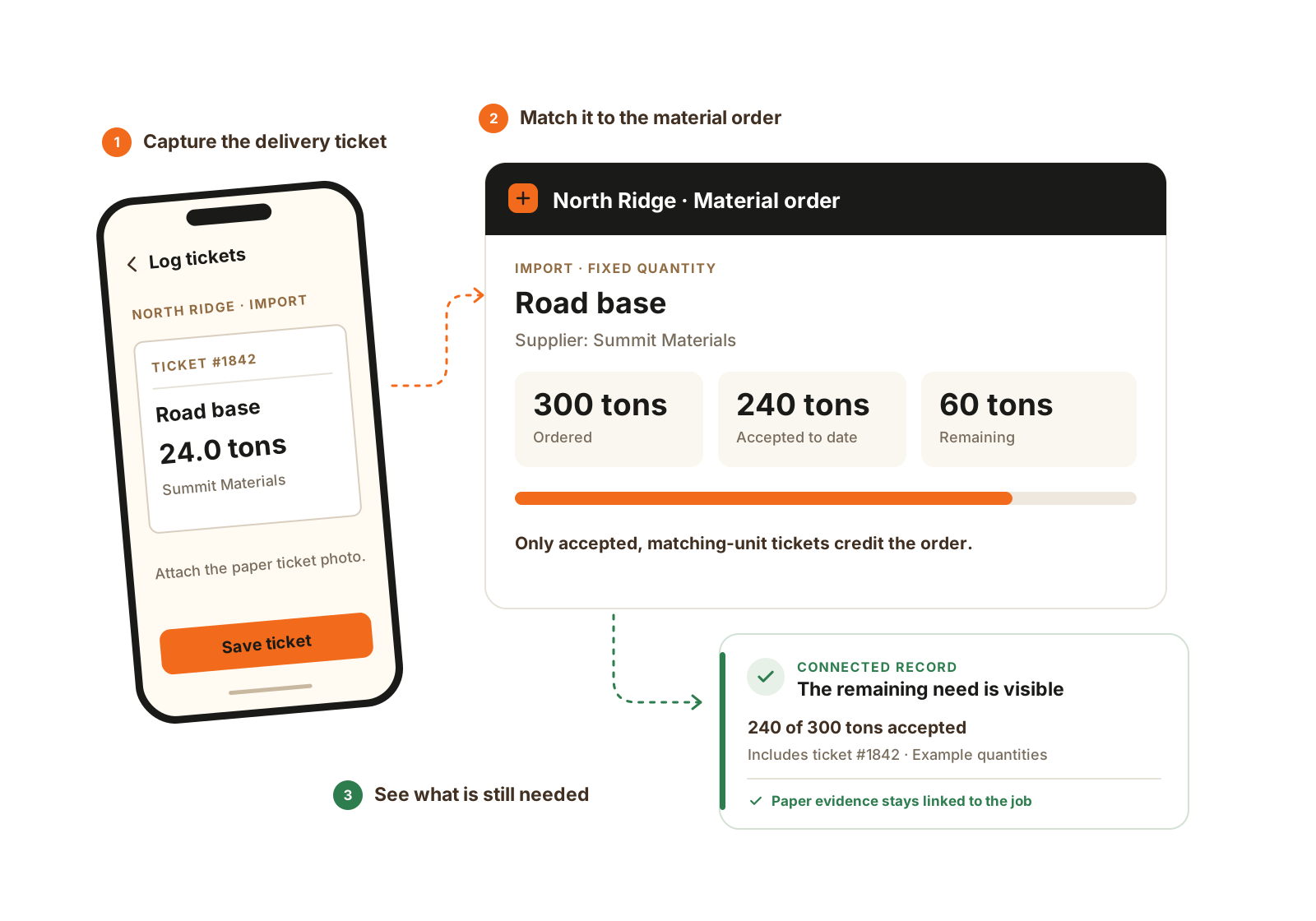
Material Tracking keeps the order and its tickets together. Accepted tickets credit a fixed order so the remaining quantity stays visible.
Inside the module
Fixed quantities or open-ended lines on the job.
Source, destination, carrier, quantity, and supporting photos.
Reuse company product and delivery rates on an order.
Review accepted quantity and cost coverage; missing inputs stay visible.
Water and hydrant meters
Put the company’s metered-water product on an open job order. Enter the dial reading when the crew checks the meter.
Each ticket keeps the reading and usage since the previous accepted reading.
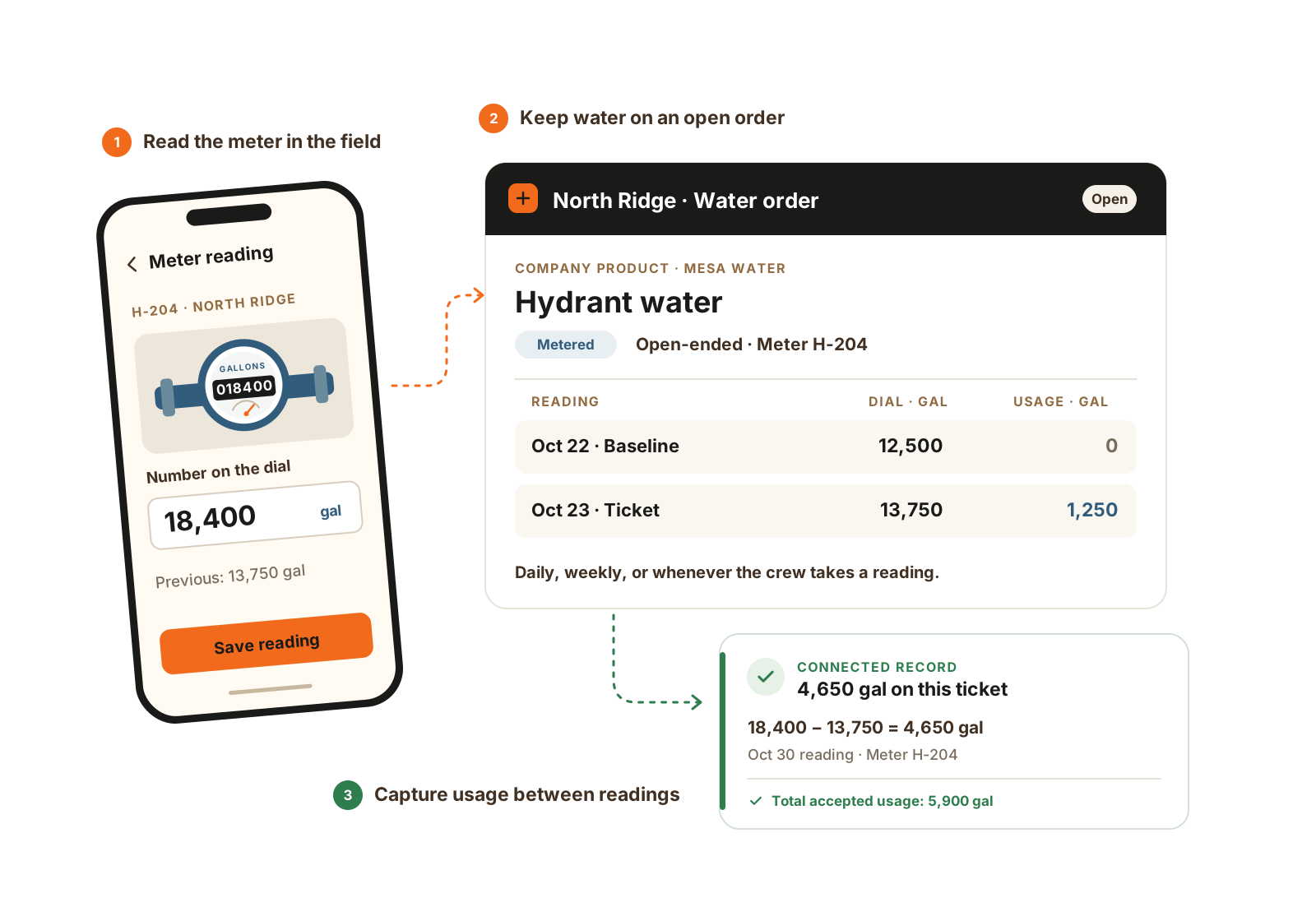
A company’s metered water product becomes an open job order. The first accepted dial reading sets the baseline; later tickets record usage between readings, whenever the crew takes them.
How it helps
When quantities are questioned, find the tickets, source, and destination on the job.

Keep material orders and their accepted tickets with the job, with the source and destination recorded.
Worked example
Illustrative readings for an open, metered water order. Read daily, weekly, or whenever the crew checks the meter.
The office stores a Metered water product under the municipality’s company record and adds it to the job’s import order. Keep a meter label on the line so readings belong to the right meter.
The first accepted dial reading is 10,000 gallons. That establishes the baseline and records zero usage; it does not count the meter’s entire lifetime total as water used on this job.
The next accepted reading is 10,750: 750 gallons since the baseline. A later reading of 12,000 records another 1,250 gallons. The two intervals total 2,000 gallons of accepted usage.
A lower reading needs a correction that starts a new baseline with zero usage. A meter swap uses a new line. Meter rental uses its own start/end and rate interval rather than water tickets.
The details that matter
Illustrative example: a 400-ton import order with accepted and rejected tickets. Follow the quantity first, then review which cost inputs cover that accepted material.
Questions
Yes. The first accepted reading sets a zero-usage baseline. Later accepted readings record the difference. Enter readings when the crew checks the meter; delivered water uses gallons per truck instead.
No. It records orders, tickets, and job material context. Truck routing and invoicing stay in other tools.
Material Tracking is a separate add-on on any plan. It uses the office and foreman seats already on the account, with no dedicated material seat.
Delivered water tickets record the gallons on the truck. A metered line records the number on the dial and derives usage from accepted readings on that line. The company product sets the supply type; the foreman selects the order line rather than switching capture methods on the ticket.
Tickets keep the number, quantity and unit, acceptance, source/destination, carrier, and supporting photos. The foreman’s mobile ticket flow supports up to two photos per ticket item. Rejected tickets remain part of the record but do not increase accepted quantity.
No. Orders, tickets, quantities, and entered costs provide a reviewable record. Invoice OCR, automatic accounting reconciliation, broker settlement, and truck dispatch are outside the current module.
Explore further
Walkthrough
Bring one current job and the records your team uses. We’ll demonstrate the relevant workflow and confirm scope, seats, and price.
We’ll use these details to respond and focus the walkthrough on your operation.