
Bulldozer pushing a windrow of soil across a graded dirt pad

Plans and pricing

Price the crew you actually run.

Compare the included office, foreman, and worker seats, then explore the workflows your crew needs. Specialist modules can extend the plan as your operation grows.

Base plans

Choose your starting plan.

Monthly base prices. Additional seats and add-ons are listed below.

Owner-operator starter

Core Crew

Starting at$160/month

For an owner-led crew keeping jobs, hours, equipment, and field notes together.

5 included seats
  • Core Operations platform
  • 1 owner/admin seat
  • 1 CutFill Field foreman seat
  • 3 CutFill Field worker seats
  • Jobs, tasks, equipment, contacts, time, notes, and simple closeout
  • Self-serve signup with optional setup help
Multi-crew base

Growing Operation

Starting at$300/month

For several crews that need maps, weather, shared views, and custom roles.

10 included seats
  • Everything in Core Crew
  • 2 office, 2 foreman, and 6 worker seats
  • Expanded Jobs and Expanded Ops included
  • Maps, weather, named areas, and advanced closeout
  • Shared views and custom roles
  • Self-serve at list price; setup help and imports quoted separately

Shop and dispatch

Full Operations

Starting at$495/month

Growing Operation plus Fleet Maintenance and Lowboy Dispatch.

10 core seats plus fleet and lowboy seats
  • Everything in Growing Operation
  • Fleet Maintenance with 1 mechanic/oiler seat
  • Lowboy Dispatch with 1 driver seat
  • Self-serve at list price; setup help and imports quoted separately

Prefer a walkthrough first? Request a demo

Extra seats

Add the seats you need.

Office

Owners, operations leads, and office users.

Foreman

Assigned crews, equipment, attendance, and daily reporting.

Field worker

Personal time, assigned tasks, and job notices.

Mechanic/oiler or lowboy driver

Additional specialized seats require the matching module. Fleet and Lowboy each include one seat.

Add-on modules

Add the workflows your crew needs.

Start with your subscription, then add the specialist workflows your operation needs. Explore the records, responsibilities, and field tools behind each module.

Expanded Jobs

Give the crew the same map, forecast, and work-area context before the shift starts.

  • Draw job boundaries and name cuts, fills, stockpiles, yards, and finish areas.
  • View saved maps in the field and check the site’s National Weather Service forecast.
  • Keep detailed closeout work lines and applicable counts tied to the right area.

Add to Core Crew; included on Growing Operation and Full Operations. Uses existing seats.

Learn more
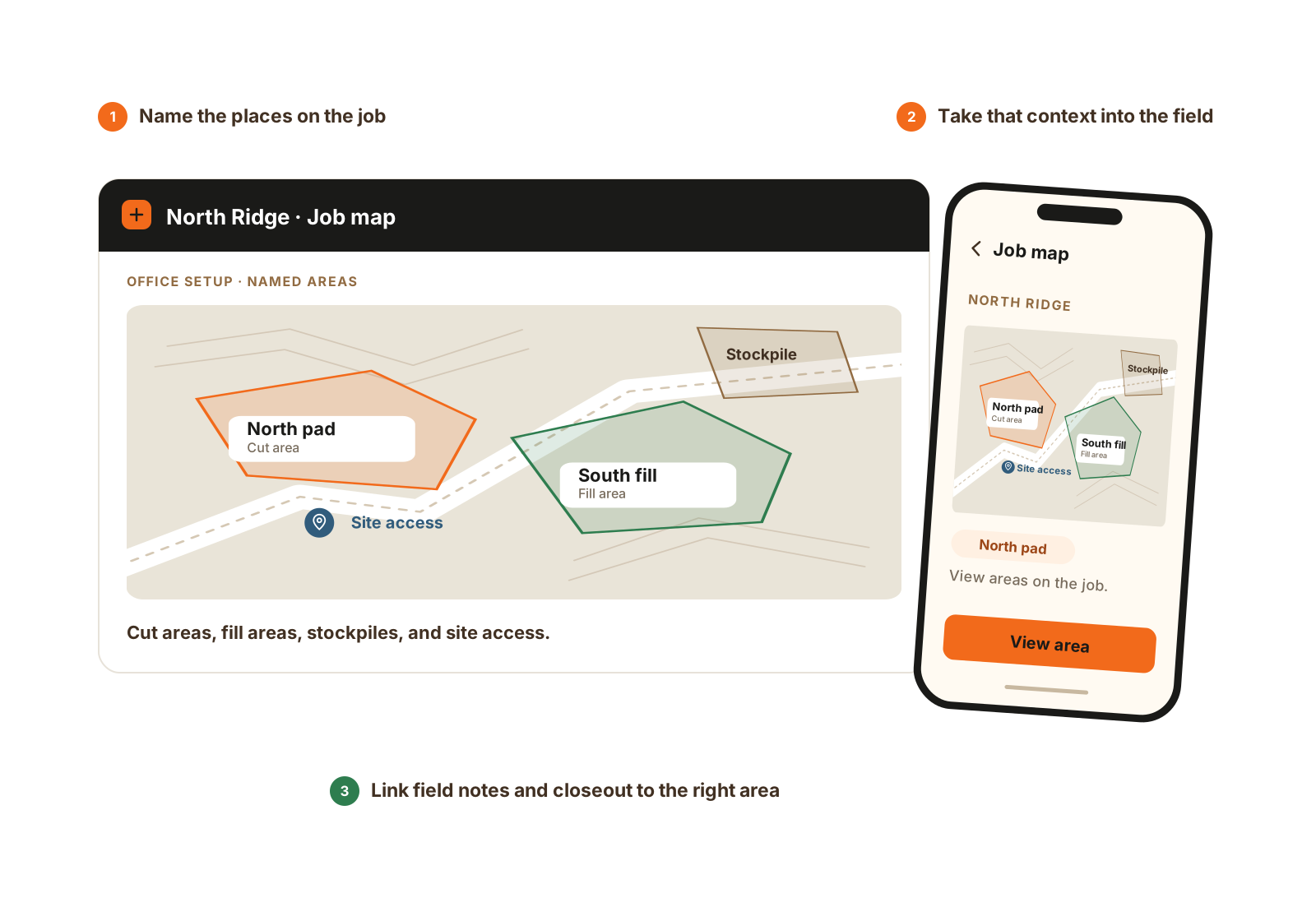
Named cut, fill, and stockpile areas appear on an illustrated job map; a phone shows the office-created map in the field.

Name the areas in the office and view the same places in the field. Job maps and area-based reporting use Expanded Jobs.

  1. Draw and name areas on the web.
  2. View the saved map on the phone.
  3. Keep notes and closeout in the right area.

Expanded Ops

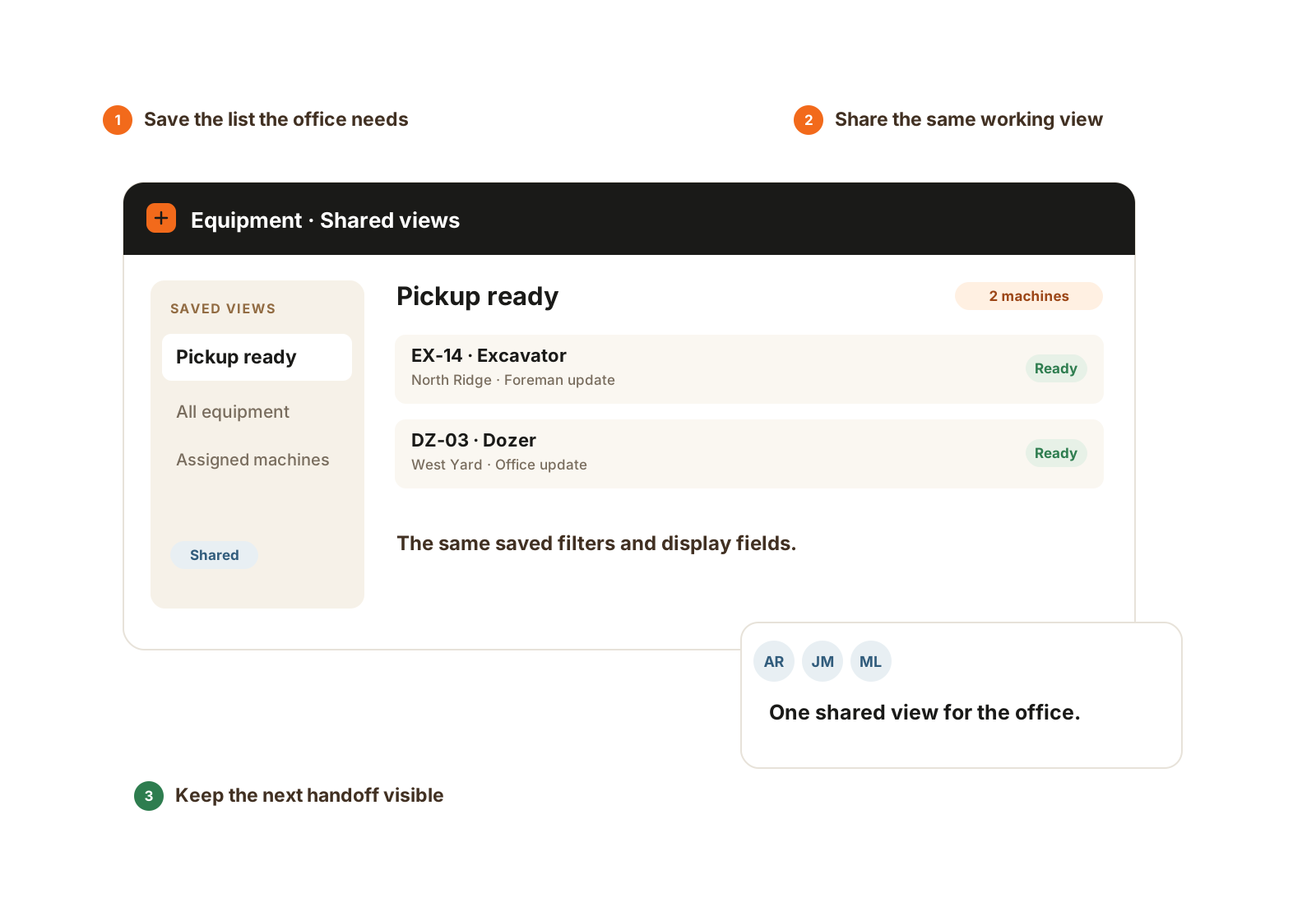
Turn the office’s working lists and time-clock policies into shared company tools.

  • Share saved filters and display fields while respecting each person’s record access.
  • Set custom roles and company-owned options within existing seat and module limits.
  • Optionally require a location fix at clock actions or reasons from your own clock-in/out lists.

Add to Core Crew; included on Growing Operation and Full Operations. Uses existing seats.

Learn more
A saved shared equipment list lets office users review the same pickup-ready machines with the same filters.

A shared saved view gives the office the same working filters and fields. Each person’s existing access still applies.

  1. Save the working list.
  2. Share its filters and display fields.
  3. Keep the next office handoff clear.

Fleet Maintenance

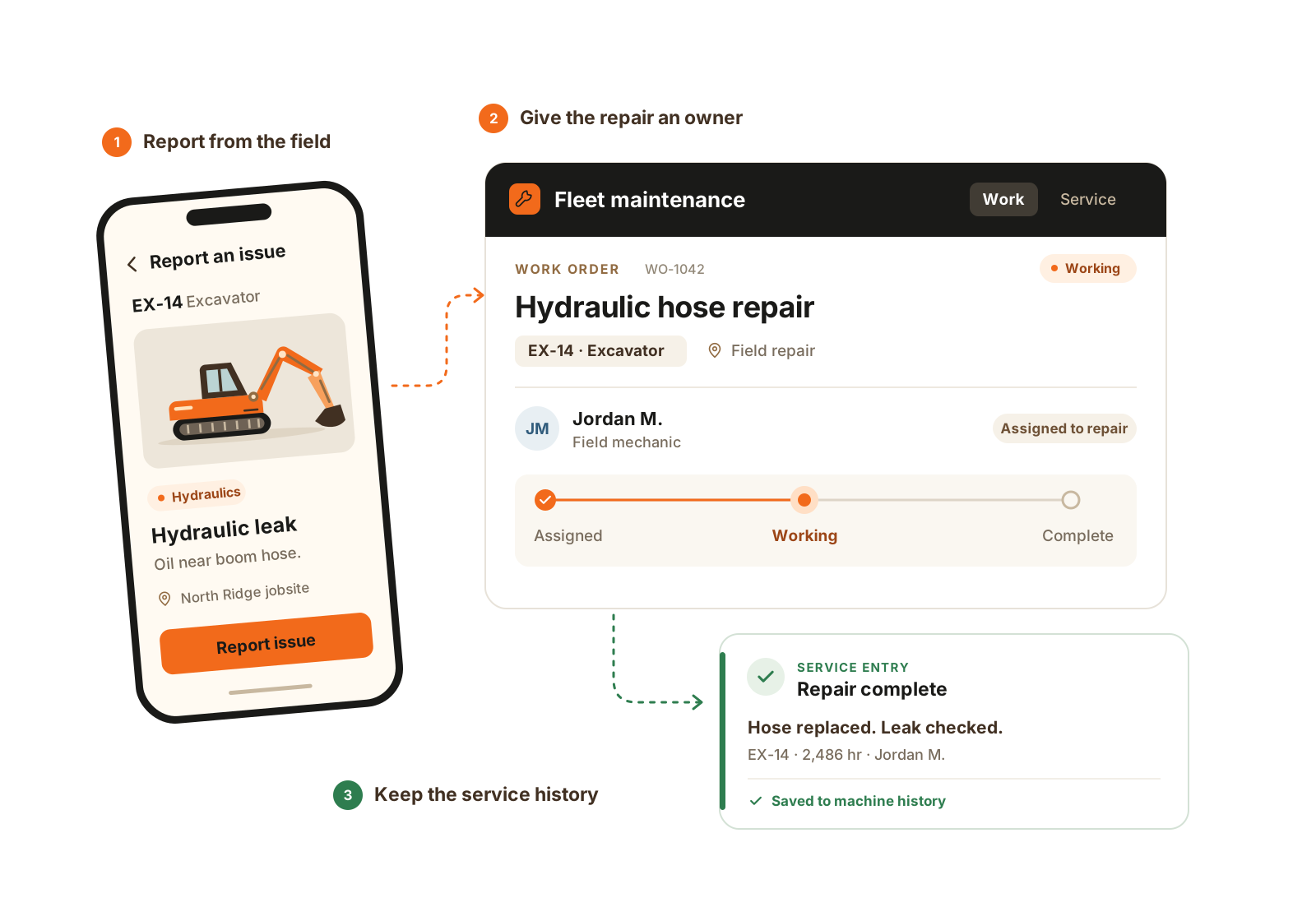
Connect the field report, the person responsible for the repair, and the machine’s service history.

  • Report issues with notes and photos, then assign field or shop work orders.
  • Keep diagnosis, waiting-on-parts updates, and completed service with the equipment.
  • Record routine machine visits, fuel, fluids, meter readings, and job service sessions.

Add to Core Crew or Growing Operation; included on Full Operations. Includes one mechanic/oiler seat.

Learn more
A field issue report becomes an assigned repair work order, then a completed entry in the excavator’s service history.

A field report becomes owned repair work, then a service record that stays with the machine.

  1. Report the machine issue.
  2. Assign and manage the repair.
  3. Record the completed service.

Lowboy Dispatch

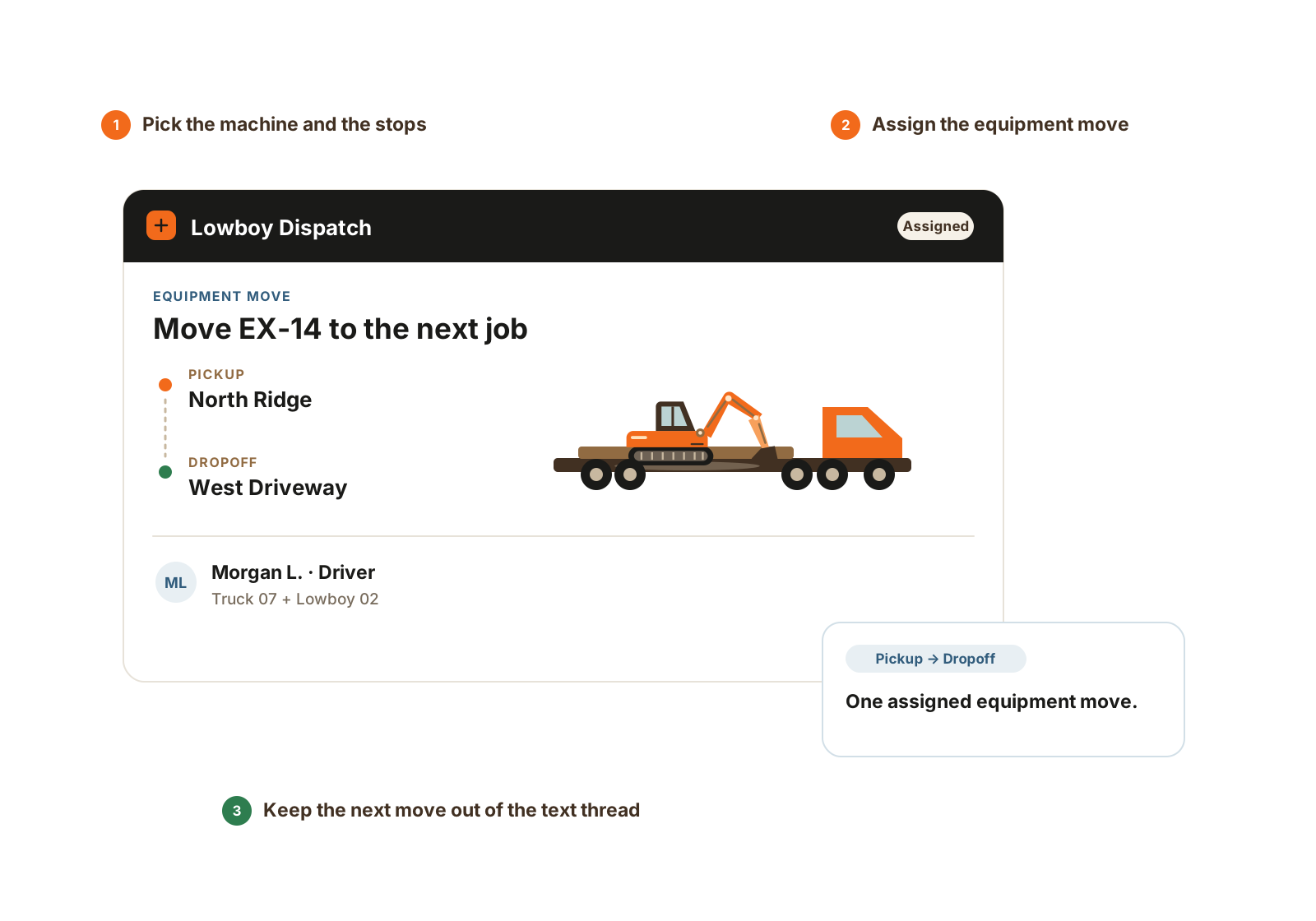
Coordinate an equipment move from the job’s ready signal through the driver’s completed dropoff.

  • Queue a move from a job, company location, or one-off address to the next stop.
  • Schedule the move and assign the driver, tractor, and trailer from the office.
  • Follow driver move stages and update the equipment’s place when the move completes. State changes require a connection.

Included on Full Operations; available as an add-on on Core Crew and Growing Operation. Includes one driver seat.

Learn more
A Lowboy Dispatch workflow connects pickup-ready equipment to an assigned driver and specified pickup and dropoff stops.

The requested machine, driver, pickup, and dropoff stay together. State changes require a connection.

  1. Queue the machine and stops.
  2. Schedule and assign the move.
  3. Record driver progress and completion.

Material Tracking

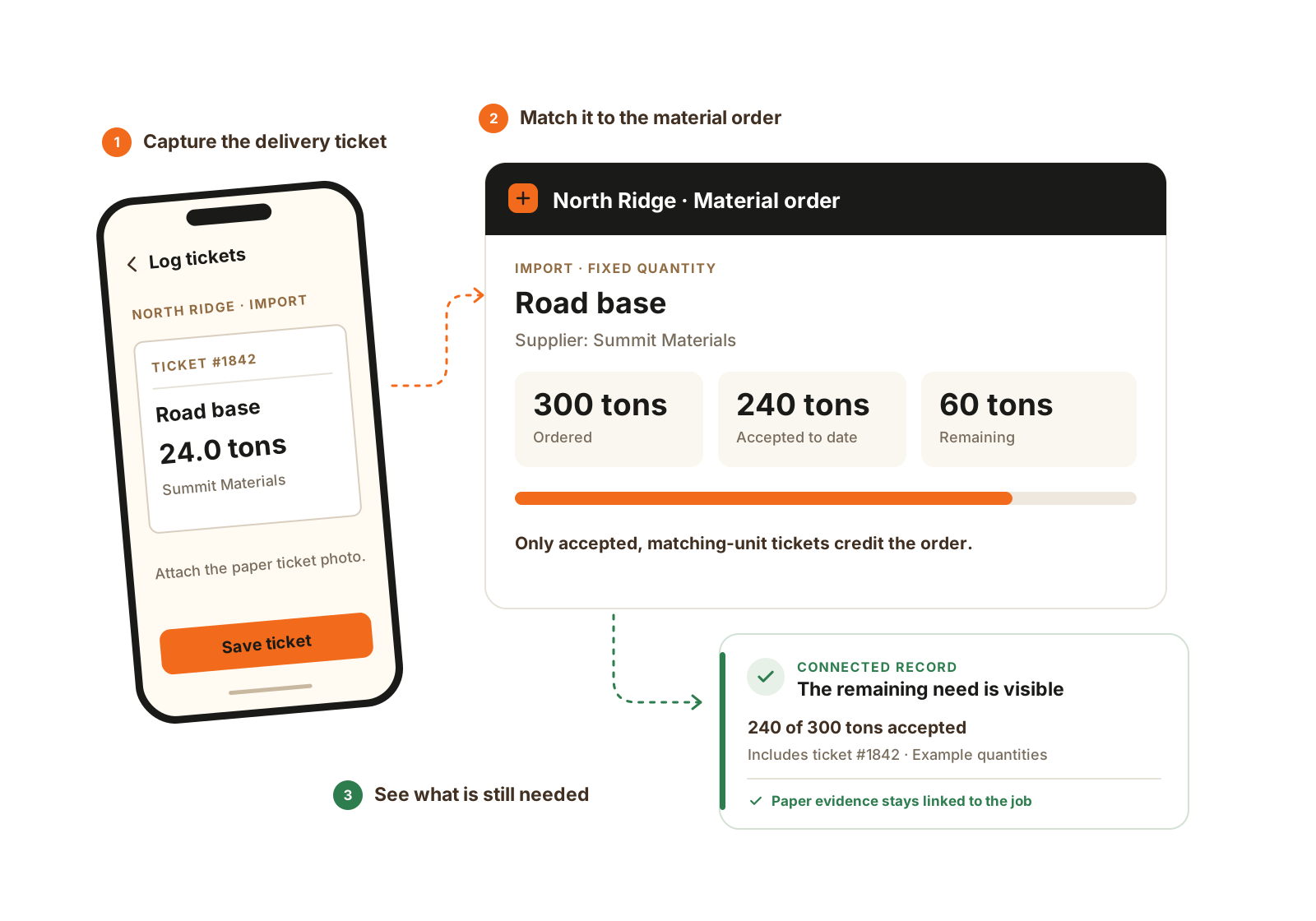
Keep the order, the ticket evidence, and the quantity the job actually accepted together.

  • Create import or export orders with fixed targets or open-ended product lines.
  • Log source, destination, carrier, quantity, unit, acceptance, and ticket photos.
  • Track delivered water or hydrant-meter readings, then review interval usage and owner/admin cost coverage.

Available as a separate add-on on every base plan. Existing office and foreman seats do the work.

Learn more
A foreman logs a 24-ton material ticket, which contributes to the accepted quantity against a 300-ton fixed material order.

Material Tracking keeps the order and its tickets together. Accepted tickets credit a fixed order so the remaining quantity stays visible.

  1. Record the delivery ticket.
  2. Link it to the material order.
  3. Review accepted quantity and remaining need.

See how different crews can configure CutFill.

Illustrative seat and module configurations. Compare the people who need access and the workflows they run.

Owner-led crew
Core Crew plus one foreman and two worker seats gives the team one office user, two foremen, and five workers. Keep the seat roles aligned with each person’s responsibilities.
Several crews with a shop
Growing Operation plus one foreman, three workers, and Fleet Maintenance covers two office users, three foremen, nine workers, and the included mechanic/oiler seat.
Maps and shared office views
Core Crew can add Expanded Jobs and Expanded Ops. Growing includes both and a larger fixed role mix. Compare the total role coverage before choosing the starting plan.

The details that matter

Build the quote from people and workflows.

The base amount is one part of the decision. Use your actual operating week to check the seat mix and any modules before comparing totals.

Count access by role
List office users, foremen, workers, and specialist mechanics/oilers or lowboy drivers. Included seats are fixed role mixes; an unused worker seat does not become an office seat.
Choose the workflow coverage
Core has simple daily operations. Compare Core plus Expanded Jobs and Expanded Ops with Growing, which includes both. Add Fleet for repair/service work or Material Tracking for orders, tickets, water, and live import/export unit cost.
Include the transition work
Bring the lists and records you want to move. Core lists account setup by CutFill; optional setup help and imports are quoted separately. Ask for those items and applicable taxes alongside the recurring plan total.

Pricing questions

How the pricing works

Can I add users without changing plans?

Yes. Add office, foreman, or worker seats to the current plan. Additional mechanic/oiler and lowboy driver seats require the matching module. We can confirm the role mix for your crew.

Are the included seats interchangeable?

No. Each bundle includes the stated office, foreman, worker, and specialized roles.

Can Core Crew add maps and weather?

Yes. Core can add Expanded Jobs for maps and weather, and Expanded Ops for shared views, custom roles, and clock controls. Growing and Full include both.

Are there setup or import fees?

Optional setup help and imports are quoted for the work needed. Confirm those one-time charges with your package.

Does Full Operations include Material Tracking?

Material Tracking is a separate add-on on every base plan, including Full Operations. It uses existing seats rather than requiring a dedicated material seat.

How do we compare plans if we need maps and shared views?

Core Crew can add Expanded Jobs and Expanded Ops. Growing Operation includes both and a larger fixed mix: two office, two foreman, and six worker seats. Compare the people and workflows you need, then confirm the full configuration with us.

Walkthrough

Get a quote for your crew.

Tell us your office, foreman, worker, and specialized-seat counts. We’ll confirm the base plan, add-ons, and any setup work.

We’ll use these details to respond and focus the walkthrough on your operation.